AI can save a UP PCS aspirant hours every week, if you use it for the right jobs: making quizzes from your own notes, explaining hard topics in simple Hindi or English, drilling General Hindi idioms, summarising long official PDFs like the UP Budget, and giving feedback on Mains answers. It is risky for one job: telling you facts about Uttar Pradesh from memory. AI tools often get state facts wrong, such as district counts, scheme years and policy names. So the rule is simple: give AI the source, then ask it to work on that source.
This post shows eight practical uses with prompts you can copy, and the checks you must do every time.
The Golden Rule: Source First
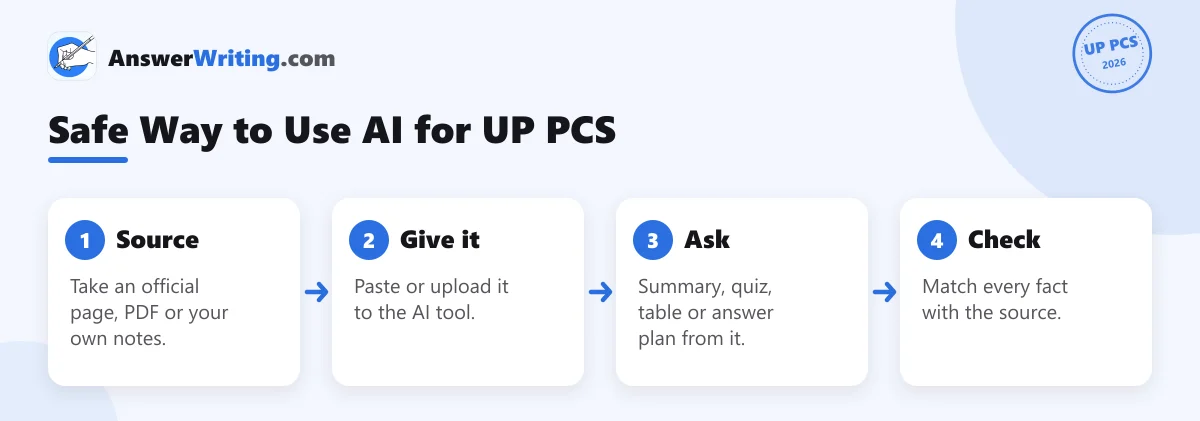
For example, the official UP state portal lists 75 districts and 18 divisions. If an AI tool tells you a different number, trust the portal. Our post on AI mistakes and how to fact-check them explains why this happens.
8 Practical Uses
1. Notes from long official PDFs
GS 6 in 2025 asked about the Green Hydrogen Policy 2024 and the Defence Industrial Corridor. Official policy PDFs are long. Upload the PDF to a tool that works on your documents, such as Gemini Notebook (earlier called NotebookLM), and ask:
Prompt: Using only this PDF, make a one-page note for UP PCS GS 6: aim, key targets, incentives, and 3 points for and against. Mark the page number for each fact.
Our guide to using NotebookLM for UPSC shows the steps.
2. UP GK quizzes from your notes
Paste one page of your UP history or geography notes and ask:
Prompt: Make 10 UP PCS style MCQs from these notes only, with four options each, mixing statement-based and match-the-following questions. Give answers at the end.
UP PCS Prelims uses many statement and matching questions, so ask for those formats.
3. General Hindi drills
Prompt: मुझे UP PCS सामान्य हिंदी के लिए 10 मुहावरे दो। हर मुहावरे का अर्थ और एक ऐसा वाक्य दो जिससे अर्थ स्पष्ट हो। फिर मुझसे 5 नए मुहावरों पर वाक्य बनवाओ और मेरे वाक्य जाँचो।
Check the meanings against a standard Hindi grammar book. AI tools sometimes mix up similar idioms.
4. Explaining a hard topic simply
Prompt: Explain the difference between the Vidhan Sabha and the Vidhan Parishad of Uttar Pradesh in simple Hindi, as if to a class 10 student, in under 150 words.
Then check numbers (403 elected members and 100 members) against the official UP legislature website.
5. Answer plans for Mains
Prompt: Here is a UP PCS GS 5 question for 200 words: “Discuss the composition, powers and functions of the Legislative Assembly of Uttar Pradesh.” Give me only an answer plan: introduction idea, 6 points with one fact each, and a conclusion. Do not write the answer.
Write the answer yourself. The plan teaches structure; writing builds speed.
6. Feedback on your written answers
General chat tools can comment on an answer, but they do not know the UP PCS word limits and marking unless you tell them, and they often praise weak answers. A tool built for exam answers gives steadier feedback. With AnswerWriting’s AI answer sheet evaluation you can upload a handwritten or typed answer in Hindi or English and get a score, a model answer and specific points to improve.
7. Current affairs in a UP lens
Paste a news report or a PIB release and ask:
Prompt: From this article only, list 3 points useful for UP PCS GS 5 or GS 6, and one possible 125-word question on it.
8. A revision timetable
Prompt: UP PCS Prelims is on 6 December 2026 (proposed). I have 3 hours a day. Make a 14-day revision plan for GS I and CSAT with one full mock test every 3 days.
What Not to Use AI For
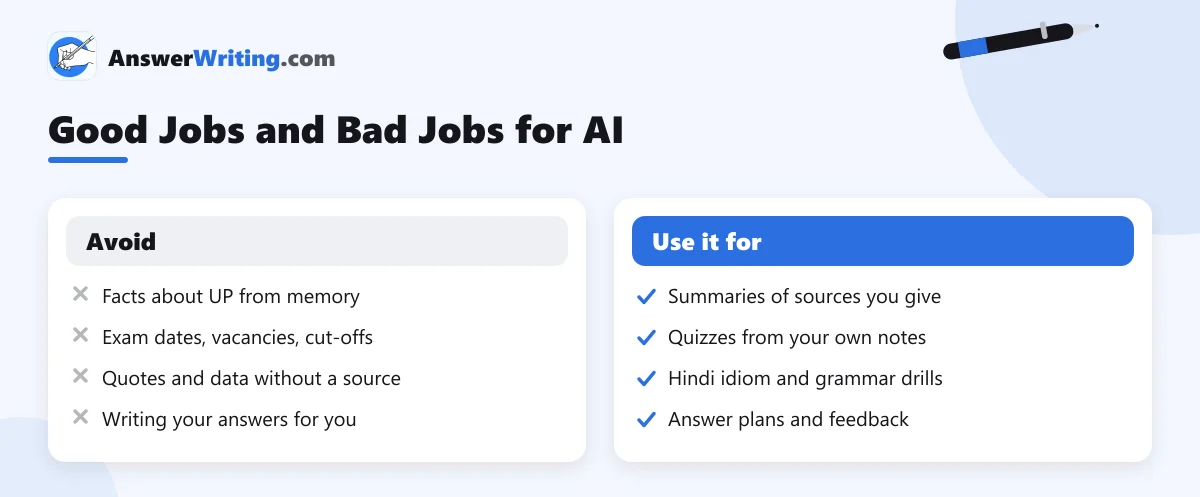
- Exam dates, vacancies and cut-offs: take them only from the UPPSC website.
- Copying AI answers: you will not have AI in the exam hall. Use it to plan and check, not to write.
- Long chats instead of study: set a limit, such as 30 minutes of AI use in a 6-hour day.
Which Tools to Use
You do not need many tools. One general assistant such as Gemini or ChatGPT for explanations and quizzes, one tool that works on your own documents, and one answer evaluator are enough. Our post on using AI for UPSC preparation covers each in more detail; the same ideas work for UP PCS.
AI feedback works best on answers written in the right format; see UP PCS Mains answer writing.
Key Takeaways
- Give AI the source first, then ask it to summarise, quiz or plan from that source.
- Check every UP fact against the official portal, the UP Budget or the department website.
- AI is useful for Hindi drills, UP GK quizzes, PDF summaries, answer plans and feedback.
- Never take exam dates, vacancies or cut-offs from AI; use the UPPSC website.
- Write your own answers; use AI to plan and to get feedback.
Try It With One Answer Today
Write one 125-word GS 5 answer by hand, photograph it, and get it evaluated on AnswerWriting with a model answer and clear feedback. Your first three evaluations are free.
Related Reading
FAQs
Can AI help me prepare for UP PCS?
Yes, for summaries, quizzes, Hindi drills, answer plans and feedback. It should not be your source of facts.
Is AI good at UP GK?
Not from memory. AI tools often get state facts wrong. Give them an official source and ask them to work only on it.
Can I use AI in Hindi for UP PCS?
Yes. Most major AI tools understand and write Hindi. Check grammar and idioms against a standard book.
Can AI check my UP PCS Mains answers?
Yes. A tool built for exam answers, such as AnswerWriting’s UP PCS evaluator, checks answers in Hindi or English against the question and gives a model answer.
Should I use AI for exam dates and cut-offs?
No. Use only the official UPPSC website for dates, notices, results and cut-offs.